
Frequently Asked Questions
In order to provide the best quality output possible we have attempted to answer your frequently asked questions. If you have additional questions please feel free to contact us.


What file format do I use?
All files should be converted to a PDF with embedded fonts. Other acceptable file formats are JPG and TIFF. Most programs including MS Word and MS Publisher allow files to be "saved as" a PDF. Customers can send us files via USB, email or through our online order.
Why the colours don't look the same on my screen?

Every monitor and/or printer will interpret the colour in your document differently. We calibrate our copiers often to make sure it prints as accurately as possible but there is no guarantee it will match the colour on your monitor or personal laser printer. For best colour results, supply a CMYK file if possible.
If you are using black, make sure you are using a Rich Black CMYK values (C:30/M:20/Y:20/K:100), for black text/type should use the following values: C0, M0, Y0, K100. Rich black is perfect for larger black coverage areas.
Why it looks so pixelated and blury?

Images should be saved at 300 dpi minimum so that they print as sharply as possible. Saving a poor quality (72 dpi) image as a high quality (300 dpi) image will not make it look or print better. Images that are saved from web site images are less the 1/3 of the recommended quality for printing.
"Why is there a white border?"

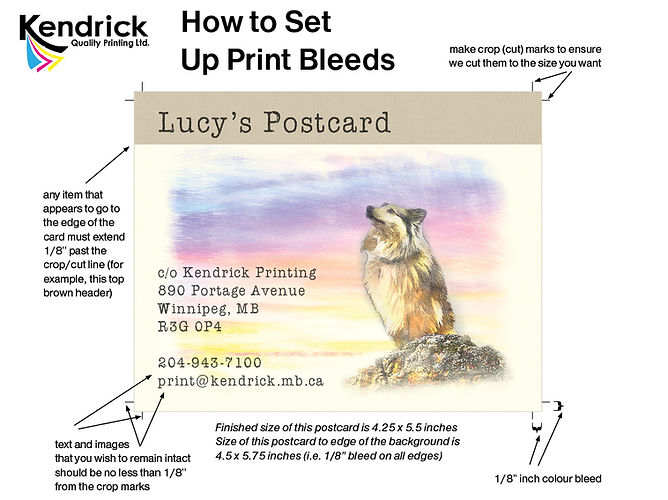
Photocopiers require a blank edge so they can grab the paper to feed it through the machine. We recommend allowing for 1/8" (0.125") of white space around the edge of the paper. Documents designed to have colour or an image right to the edge of the paper are said to have a "bleed". Designs with a bleed usually require crop (cut) marks and the image must extend past the crop line. The entire document must fit inside the printable area of the page. Please see "How to Set Up Print Bleeds"
What are glossy and matte finishes, and what is the difference between them?
Paper generally comes in two main finishes: glossy and matte. Glossy paper has a smooth, shiny surface that reflects light evenly. It offers excellent ink holdout, producing sharp, vibrant images that make flyers, posters, and marketing materials pop. In contrast, matte paper absorbs light to create a softer, non-glare finish. Its versatile look makes it ideal for everyday printing, wedding invitations, and standard black-and-white documents.
How can I setup my file for full bleeds printing?
Why can't I get a colour copy of my IDs?
©
The Copyright Act (Canada) governs the making of photocopies or other reproductions of the copyrighted material. If you have any questions about the copyright law please contact the Copyright Office 1 (819) 997-1936. The following can only be copied in Black & White:
-
Passports
-
Driver's Licence
-
Badges
-
Identification Cards
-
Birth Certificates
-
Diplomas
-
Immigration Papers
-
Signatures
-
Certificates of Citizenship
-
School Transcripts
-
Parking Permits
-
Certificates of Title